
Growing up, The Hindu, a leading Indian daily, was the one newspaper my family and I read every day. Therefore, it is interesting to see how their website has grown over the years. The Hindu had a surprisingly early web presence. The first instance of their live website was on December 12th, 1998. The website was quite basic, with the news being divided under sections such as “Front Page,” “International,” “Business,” and “Sports,” much like how one would see it in a print newspaper. Clicking on “Front Page,” would list all the articles that appeared on the front of page of that day’s newspaper and allow you to click through each article. The font was a dated serif font. At this stage, there didn’t seem to be many ads, but there are a few of supplementary magazines for The Hindu listed on the side of the website.

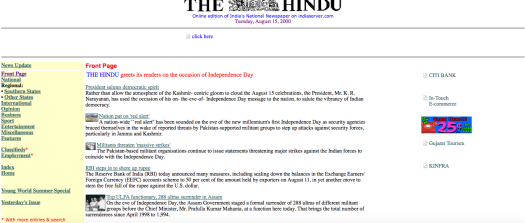
As early as August 2000, The Hindu introduced ads on their website, with flashing images lining the side (Call India 25 cents/m!). Each article also had a link at the bottom which read “Send this article to Friends by E-Mail” and looks like a throwback to what is now the popular “Share” button on all online publications. The homepage looked a lot cleaner, and the title appeared in a bright red and blue font. The mobile design was the same as the website design at this stage.
Looking at their website now, there are many improvements. The website allows the reader to access the news in two different ways. The reader has the option of reading the digital publication in the same way they would read the physical newspaper via the “Today’s paper” link. Through this method, you can read the newspaper articles in order and bundled as in the physical paper. The other option is to read the paper by jumping through different sections via the drop down menus. The drop down menus are quite specialized, allowing you to find cricket news, for example, not just under “Sports,” but also directly under “Cricket” or “Hockey.”

I also like that the homepage isn’t littered with many photos. There are a couple, but they aren’t overwhelming. Instead, they provide context to the top story of the day and direct the reader’s attention there. The logo is clean, as is the easily clickable Facebook, Twitter, and Instagram widget which connects the publication to different social media platforms. There are no ads on the current website.
The Hindu is considered to be a serious publication, and therefore uses simple colors on the website—white and grey, and a stark blue logo—which make it look clean and elegant. This image fits with the brand of The Hindu. The website loads in less than a second, perhaps due to the lack of videos and images on their website. There is also a comment section at the end of each article, but this seems to be rarely used. On the other hand, the Facebook and Twitter share buttons show numerous likes and shares, so the community therefore seems to be active on these social media platforms.

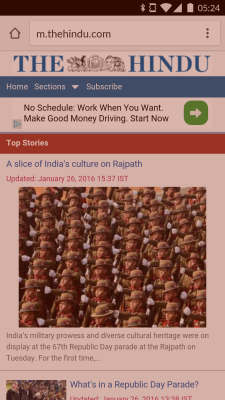
The mobile website does seem to have a longer load time of about 3–4 seconds, and it loses some of its desktop features. For example, there is no daily newspaper; instead it is divided by subject matter. The m.hindu.com website also seems to have an ad banner which is missing from the full website. Overall, the mobile design is a little more clunky than the website design. I think it would be helpful to have a sidebar that pops in and out and divides the paper instead of users having to scroll through sections such as “Breaking News,” “Editorial,” and “Magazine.” Despite what it lacks, it serves well as a companion to the full website. But if readers are looking for a cleaner and more streamlined experience, The Hindu is best viewed in its desktop version.


You must be logged in to post a comment.